General Information
The sys-sage library incorporates the **P**erformance **A**pplication **P**rogramming **I**nterface [1] (PAPI) to enable the integration of hardware performance counters on CPUs into the sys-sage topology. That way, the performance metrics gained through PAPI can be attributed directly to the relevant hardware components, thus allowing for the examination and interpretation of the performance metrics within the context of the hardware topology.
To enable this feature, use the -DPAPI=on flag when building the sys-sage library. Apart from PAPI itself, note that hwloc is required as a dependency. Please make sure that it's installed on your system and provide an XML file generated by hwloc (e.g. lstopo topo.xml) to sys-sage::parseHwlocOutput.
A link to the PAPI Wiki can be found here.
General Workflow
The following diagram shows the overall workflow of the PAPI metrics collection and evaluation through sys-sage:
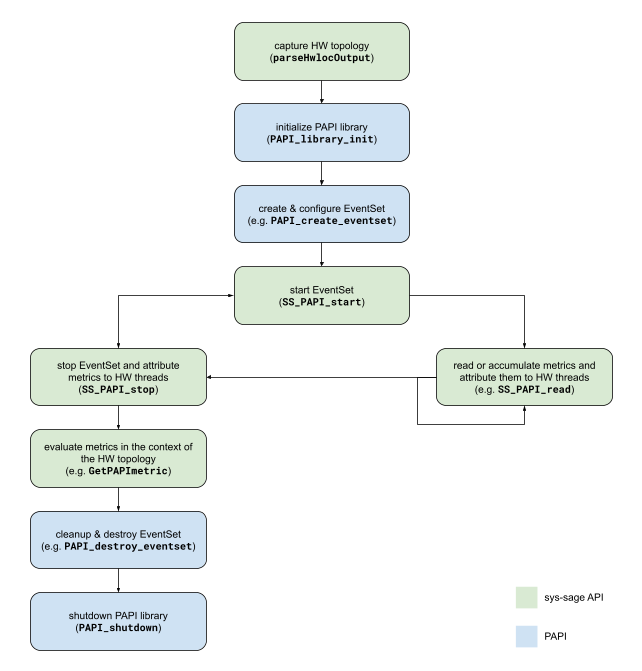
The green boxes correspond to the sys-sage API whereas the blue ones correspond to plain PAPI. In general, the creation and configuration of event sets remain with PAPI, while the performance monitoring is now managed through sys-sage.
API overview
In principle, sys-sage uses a sys_sage::Relation object to capture the performance counter values and to simultaneously relate them to the hardware threads, which are of type sys_sage::Thread, on which they have been monitored on. To realize the PAPI integration, wrapper functions are provided that envelop the underlying PAPI routine. They will behave exactly like the underlying PAPI routine, with the added logic of automatically handling the storage of the performance counter values within the sys-sage topology via relation management. The wrapper functions are
| sys-sage wrapper | corresponding PAPI routine |
|---|---|
sys_sage::SS_PAPI_start | PAPI_start |
sys_sage::SS_PAPI_reset | PAPI_reset |
sys_sage::SS_PAPI_read | PAPI_read |
sys_sage::SS_PAPI_accum | PAPI_accum |
sys_sage::SS_PAPI_stop | PAPI_stop |
In general, the sys-sage wrappers can coexist with plain PAPI and can therefore be used next to the PAPI routines. This extends to routines like PAPI_create_eventset, PAPI_attach and so on. However, the wrappers SS_PAPI_start, SS_PAPI_reset and SS_PAPI_accum must be used instead of PAPI_start, PAPI_reset and PAPI_accum respectively.
To access or display the performance metrics that are integrated into the sys-sage topology, the following functions are provided
| Routines to access & display PAPI metrics |
|---|
sys_sage::Relation::GetPAPImetric |
sys_sage::Relation::GetAllPAPImetrics |
sys_sage::Relation::PrintPAPImetrics |
sys_sage::Relation::FindPAPIevents |
sys_sage::Relation::GetCurrentEventSet |
sys_sage::Relation::GetElapsedTime |
sys_sage::Thread::GetPAPImetric |
sys_sage::Thread::PrintPAPImetrics |
sys_sage::Thread::GetPAPIrelation |
sys_sage::Thread::FindPAPIrelations |
sys_sage::Thread::FindPAPIeventSets |
sys_sage::Component::PrintPAPImetricsInSubtree |
sys_sage::Component::FindPAPIrelationsInSubtree |
Going through an example
For more sophisticated examples, please have a look at the examples/ directory of the sys-sage repository. The examples include
papi_basics.cpp: Simple usage of sys-sage PAPIpapi_multithreading.cpp: Exploring multihreading in sys-sage PAPIpapi_monitor_process.cpp: Exploring third-party monitoring of another process in sys-sage PAPIpapi_migrate_cpus.cpp: Showcase of performance monitoring on a thread that constantly migrates across CPUs
A minimal example is provided below. Note that error handling has been left out for the sake of simplicity and clarity. All sys-sage PAPI wrappers have adopted the return error codes of PAPI. Please refer to PAPI's Wiki for the error codes and to the documentation of the wrappers themselves for more information.
First, the sys-sage topology is created by parsing the XML file that is gained through hwloc. The node component then points to the root of the topology. Afterwards, the PAPI library and an event set are initialized as usual.
Now, in order to attribute the performance counter values to the hardware components, the sys-sage library uses a relation to naturally link them together. For this purpose, a pointer of type sys_sage::Relation is provided to sys_sage::SS_PAPI_start. Since metrics is nullptr, the sys-sage library will create a new relation object, which metrics will point to after the call to sys_sage::SS_PAPI_start. If it already points to a valid relation object, that object will be reused instead. Within the same call, the underlying PAPI_start routine will be used to start the event set. This will also bind the relation object to an event set. When bound to new event set, the relation object does not loose the metrics of the previous event set.
After some computation, the wrapper sys_sage::SS_PAPI_stop is called to stop the event set and to automatically integrate the performance counter values into the topology. After this call, the relation object is also unbinded from the event set. Information about the performance counter values and the associated hardware components can be obtained through the relation object or through the component tree. In this case, this information is simply printed to stdout using the relation object.
At the end, the event set is cleaned up and the PAPI library is shut down. Note that the PAPI related functions offered in the sys-sage API will not work if the PAPI library is shut down.
Implementation Details
This section of the documentation is intended for more specific knowledge about the internal structure and functionality.
Naming Convention
Let's provide some definitions:
- "software thread": a software abstraction of an independant execution stream within a process.
- "hardware thread": an independant execution unit in hardware.
- "CPU": the same as a hardware thread
What happens under the hood?
The wrappers SS_PAPI_read, SS_PAPI_accum and SS_PAPI_stop all follow a very similar strategy:
- Based on the given event set, determine the events associated to it and store the event codes in a local array called
events. - Perform the call to the underlying PAPI routine using a local array called
counters.SS_PAPI_read->PAPI_readSS_PAPI_accum->PAPI_accumSS_PAPI_stop->PAPI_stop
Depending on the event set, figure out to which hardware thread the counters belong to and find its ID. Here, we need to make a case destinction:
- If the event set has explicitely been attached to a hardware thread, simply query for the ID through PAPI.
- If the event set has explicitely been attached to a software thread, get the last known hardware thread on which it was scheduled on by reading
/proc/<tid>/stat. - Otherwise, the event set is implicitely attached to the current software thread, in which case we simply call
sched_getcpu().
In the last two cases, the software thread can potentially migrate across multiple hardware threads through repeated re-scheduling. Since PAPI uses
perf_event_openinternally, the Linux kernel will preserve the intermediate performance counter values across context switches. To "keep track" of these hardware threads and to attribute the performance counter values to them, a relation object with the new relation categoryRelationCategory::PAPI_Metricsis used.- Together with the ID of the hardware thread, query for its handle in the sys-sage topology. If the hardware thread is not already contained in the
Relationobject, it will be added to it. - Store the values of
countersinto theattribmap of the relation object on a per-event basis, meaning that if the valuecounters[i]at indexicorresponds to the eventevents[i], we will have a key-value pair similar to{ events[i], counters[i] }. Note that the values are actually stored as entries of a datastructure and that the string representation of the event code is used as the actual key. More detail is given below.
Multiple Performance Counter Readings
We define a "performance counter reading" to be the act of fetching the current values of the performance counters. It may be triggered by a call to either SS_PAPI_read, SS_PAPI_accum or SS_PAPI_stop.
Now, the sys-sage library allows the user to store the results of multiple performance counter readings of the same event. To distinguish them from one another, timestamps have been introduced. A timestamp is always associated to the entire reading, meaning that performance counter values of different events share the same timestamp within the same reading. It is important to state that these timestamps are not guaranteed to be unique for every reading – although most likely they will – and in case of a collision, the value of the latter reading will be returned.
Rules for the Storage Mechanism of the Performance Counter Values
For the purpose of simplicity, we will focus on single-event event sets in this section. Everything described here can be easily extended to multiple events.
Let's define the operations READ, RESET and ACCUM, which correspond to the respective PAPI routines. We have
- READ: capture the perf current counter value and store it
- RESET: set the perf counter to 0
- ACCUM: capture the current value of the perf counter, add it to some data, and perform the RESET operation
Furthermore, each entry of the datastructure containing the perf counter values can be either in the permanent or temporary mode (indicated by a parameter). If an entry is temporary, it may be overwritten by some new perf counter reading. If it is permanent, it may not be modified again, and therefore a new entry must be added to the datastructure.
Now, the rules are as follows:
- If a RESET operation is followed by a READ operation, all temporary entries on all CPUs of that specific event will be deleted.
- If there are no more entries in the datastructure of a CPU, that CPU will be removed from the relation.
- The value extracted from a READ operation will be "split" among all CPUs whose latest entry is temporary and contains a value that stems from the latest reading.
If $x$ is the value gained from a READ operation on CPU $a$ and $y$ is the sum of values of all CPUs in the relation that satisfy the above conditions, then the result $z := x - y$ is stored in an entry corresponding to CPU $a$.
- The value extracted from an ACCUM operation will be "merged" with all CPUs whose latest entry is permanent and contains a value that stems from the latest reading.
If $x$ is the value gained from an ACCUM operation on CPU $a$ and $y$ is the sum of values of all CPUs in the relation that satisfy the above conditions, then the result $z := x + y$ is stored in an entry corresponding to CPU $a$.
References
[1] Jagode H, Danalis A, Congiu G, Barry D, Castaldo A, Dongarra J. Advancements of PAPI for the exascale generation. The International Journal of High Performance Computing Applications. 2024;39(2):251-268. doi:10.1177/10943420241303884